How a Discount Coupon Canva Template Streamlines Your Promotional Workflow
Creating effective discount coupons is more than just slapping a percentage off on a plain square. It involves design decisions, brand consistency, audience targeting, and distribution timing. For professionals, entrepreneurs, and marketers who need to produce these assets regularly, a Discount Coupon Canva Template offers a structured starting point that saves time while maintaining quality.
Rather than treating this as a one-off design task, think of it as a repeatable component within your broader promotional process. Whether you are launching a seasonal sale, rewarding loyal customers, or testing a new pricing strategy, having a template ready allows you to focus on the message and the offer rather than reinventing the layout each time.
What a Discount Coupon Canva Template Actually Does
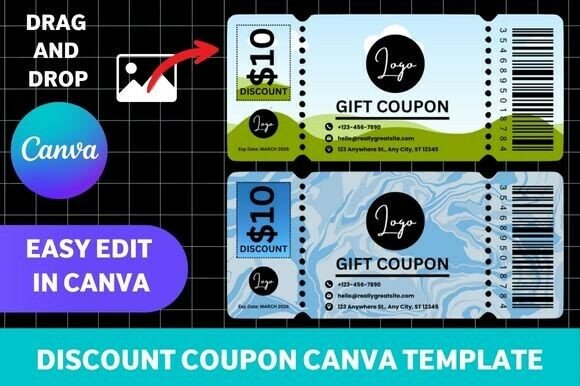
At its core, a Discount Coupon Canva Template is a pre-designed document in Canva that includes placeholders for your offer details, brand colours, typography, and imagery. You open it, edit the text, swap in your logo, and export. But its real value lies in how it fits into your planning and execution cycle.
For a freelancer or small business owner, this template becomes a reusable asset in your marketing toolkit. For a marketing team, it ensures every coupon aligns with brand guidelines without requiring a designer's involvement for every minor update. For an educator or blogger offering a paid resource, it provides a professional-looking incentive that builds credibility.
The Before Phase: Planning Your Offer with the Template in Mind
Before you even open Canva, consider how the template will interact with your overall campaign. Start by defining the goal of the coupon. Is it to drive first-time purchases, clear inventory, or reward repeat customers? The template should reflect that intent through its tone and visual cues.
Prepare the following elements ahead of time:
- Your brand assets – logo, colour palette, and font choices. Upload these to Canva so they are available within the template.
- Offer details – discount amount, expiry date, terms and conditions, and any unique code.
- Distribution format – will this be printed, shared as a PDF, posted on social media, or embedded in an email? Each format may require slight variations in dimensions or resolution.
Having these ready means you can populate the template in minutes rather than scrambling for files mid-process. This upfront preparation is where the template saves the most time.
Integrating the Template into Your Workflow
The real power of a Discount Coupon Canva Template emerges when you integrate it into your broader content production pipeline. Instead of treating coupon creation as a separate, ad-hoc task, make it part of your regular promotional cycle.
During the Design Phase: Editing and Customising
Once you open the template, you are working within a structure that already balances visual hierarchy, whitespace, and call-to-action placement. Your job is to replace placeholder content with your own. This is where consistency comes into play.
Keep these practices in mind:
- Maintain the original layout unless you have a strong reason to change it. The template was likely designed with usability in mind.
- Use your brand colours consistently across all coupon variations. This builds recognition and trust.
- Keep the offer prominent. The discount value or percentage should be the most visible element, followed by the expiry date and any code.
- Test readability on different devices if you are sharing digitally. What looks good on a desktop screen may be illegible on a phone.
Canva allows you to save multiple versions of the same template. Use this to create variations for different audience segments or channels. For example, a high-resolution print version and a compressed social media version can both originate from the same base template.
After the Design: Distribution and Tracking
Once your coupon is ready, the template's role shifts from creation to consistency. Because you used a standardised template, all your coupons share a cohesive look. This makes them recognisable to your audience across email, social media, print, and your website.
Consider these distribution touchpoints:
- Email campaigns – embed the coupon image directly or link to a downloadable PDF.
- Social media posts – share a square or vertical version optimised for each platform.
- Print materials – use a high-resolution export for flyers, receipts, or direct mail.
- Website pop-ups or landing pages – integrate the coupon as an incentive for sign-ups or purchases.
Tracking is often overlooked when using templates. Include a unique code or QR code within the template that you can monitor. This connects your design work directly to conversion data, allowing you to measure which offers and channels perform best.
Practical Implementation Tips for Different Roles
The way you use a Discount Coupon Canva Template will vary depending on your context. Here are some role-specific approaches.
For Small Business Owners and Entrepreneurs
You are likely managing multiple responsibilities. A template removes the need to learn advanced design software or hire a graphic designer for every promotion. Keep a folder of templates for different offer types: percentage discounts, fixed amount discounts, free shipping, and buy-one-get-one deals. Rotate them based on your current campaign.
Set aside 30 minutes at the start of each month to update the templates with upcoming offers. This batch-processing approach prevents last-minute scrambling and ensures consistency across all your customer touchpoints.
For Marketers and Content Creators
You need speed and scalability. A single template can be duplicated and adapted for multiple segments. For example, you might create variations for new subscribers, loyal customers, and inactive users, each with a different offer but the same visual structure.
Collaboration features in Canva allow team members to edit the same template without overwriting each other's work. This is particularly useful when multiple people need to approve the final design before it goes live.
For Educators, Bloggers, and Freelancers
Your audience expects professionalism, even if you are a solo operator. A well-designed coupon signals that you take your work seriously. Use the template to create discount codes for course enrollments, paid newsletters, ebooks, or consulting sessions.
Because your brand identity may still be evolving, choose templates with clean, minimalist layouts that are easy to adapt as your visual style matures. Avoid overly trendy designs that will look dated next year.
Quality Control and Long-Term Use
Over time, your Discount Coupon Canva Template collection becomes an asset that needs maintenance. Periodically review your templates to ensure they still reflect your current branding. Update colours, fonts, and contact information as your business evolves.
Check for these quality factors:
- Resolution – ensure exports are high enough for print if needed.
- Accessibility – use sufficient contrast between text and background so that people with visual impairments can read the offer.
- File organization – name your templates clearly (e.g., "Spring Sale 20% Off – Social Media") so you can find them quickly.
- Version control – keep a master template that you never edit directly. Always work from a copy. This preserves a clean original for future use.
Consider creating a short checklist that you run through before publishing any coupon. This might include verifying the expiry date, testing the discount code, and checking that all links work. Integrate this checklist into your workflow so it becomes a habit rather than an afterthought.
How the Template Interacts with Other Tools and Platforms
A Discount Coupon Canva Template does not exist in isolation. It connects with your email marketing platform, your e-commerce system, your social media scheduler, and your analytics tools. Understanding these integrations helps you use the template more effectively.
For instance, if you use Mailchimp or ConvertKit, you can design the coupon in Canva, export it, and then embed it directly into your email template. If you run an online store on Shopify or WooCommerce, you can generate unique discount codes within the platform and then place them into your Canva design. This separation of concerns keeps each tool doing what it does best.
If you schedule social media posts with Buffer or Hootsuite, create a batch of coupon images at once and upload them into your content calendar. This aligns your design process with your distribution schedule, reducing friction on busy days.
Adapting the Template for Different Campaign Types
Not all discounts are created equal. A clearance sale requires a different tone than a loyalty reward. Your template should be flexible enough to accommodate these nuances without starting from scratch each time.
Create a few variations of your base template:
- Urgency-focused – bold colours, large countdown text, and prominent expiry dates for flash sales.
- Value-focused – clean, professional layout with emphasis on the savings amount for subscription offers.
- Thank-you focused – warm tones and subtle design for loyalty rewards or customer appreciation.
Each variation stems from the same core layout but adjusts the emotional tone through colour, typography, and imagery. This approach gives you consistency without monotony.
Final Observations on Integrating the Template into Your Routine
The most effective users of Discount Coupon Canva Templates treat them as part of a system, not as a standalone task. They prepare assets in advance, use the template to enforce brand consistency, and connect the output to their distribution and tracking tools.
If you are just starting out, choose one high-quality template and use it for your next three promotions. Pay attention to what works and what feels limiting. Over time, you will develop a sense for which layout elements are essential and which are flexible. This understanding allows you to customise the template without breaking its effectiveness.
Remember that the template is a tool for efficiency, not a crutch. The offer itself, the timing of the promotion, and the clarity of your call to action are ultimately what drive results. The template ensures that your coupon looks professional and aligns with your brand, so your audience focuses on the value you are offering rather than being distracted by poor design.
By embedding a Discount Coupon Canva Template into your regular promotional workflow, you reduce friction, maintain consistency, and free up mental energy for the strategic decisions that actually grow your business or project.